Was it permitted?
Two independent gates decide it: the role's permission, and the topic rule that brings the topic into scope. Either one can refuse.
Policy-controlled MQTT for industrial systems, with attributable and reviewable access decisions.
A publish fails. The client prints a protocol error, or nothing at all. Somewhere between a role, a topic rule and a broker config is the reason — and by the time anyone asks, the evidence has to already exist. TrailMQ records the actor, the client, the topic, the outcome and the reason at the moment the broker decides.
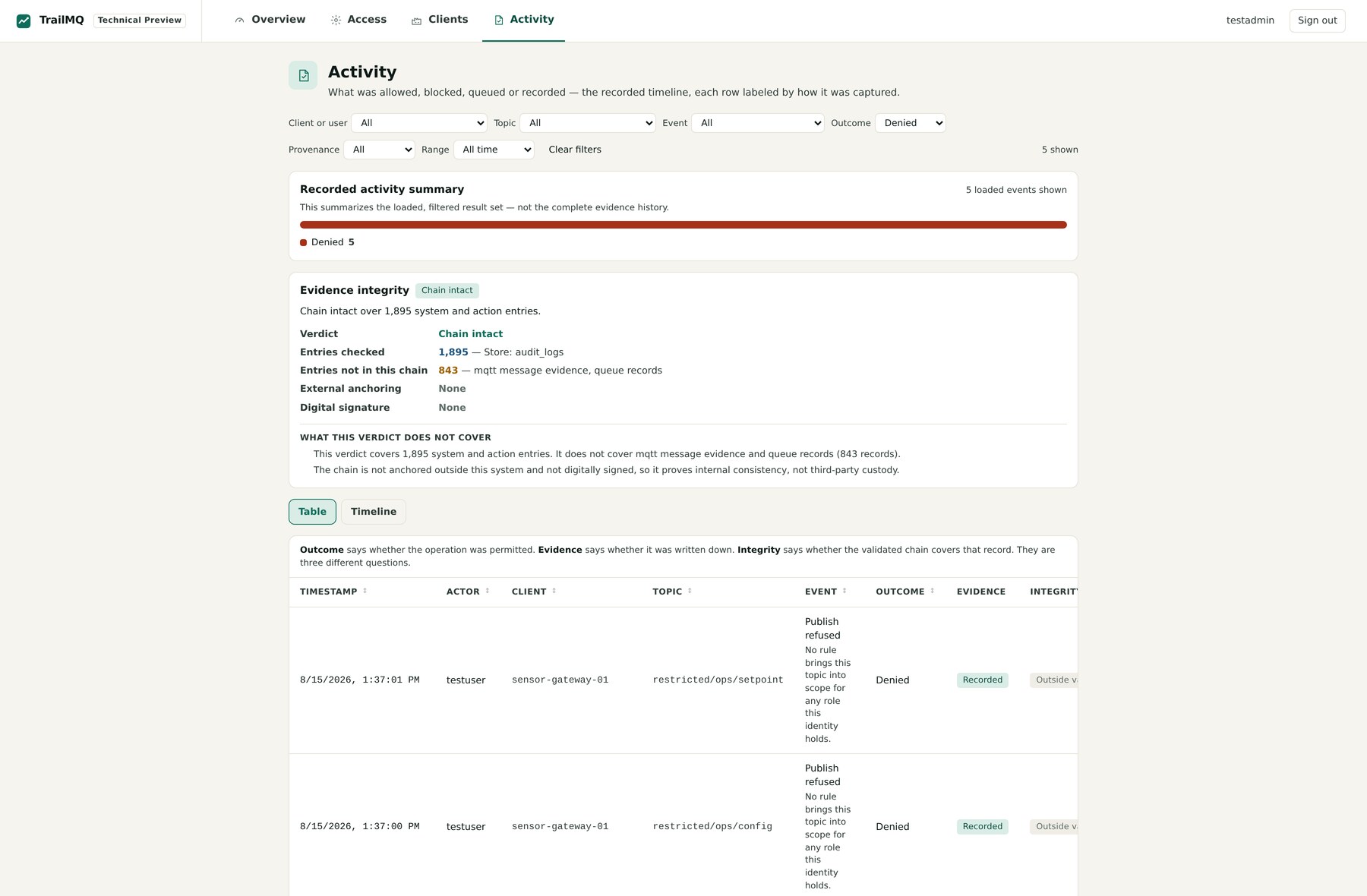
demo-sensor-gateway-01restricted/ops/configTrailMQ separates them on purpose, and says so in its own Activity view: Outcome says whether the operation was permitted. Evidence says whether it was written down. Integrity says whether the validated chain covers that record. They are three different questions.
Two independent gates decide it: the role's permission, and the topic rule that brings the topic into scope. Either one can refuse.
Refusals, sign-ins and administrative changes are always recorded. Recording the messages themselves stays a per-topic decision.
A hash-linked chain covers system and action entries and reports its own scope. MQTT decision records sit outside it, and are labelled that way.
Conflating these three is how a system ends up claiming more than it can show.
Six steps, about ninety seconds. Every command, error message and reason below comes from the shipping TrailMQ 3.1.1 evaluation stack and its published scenarios — you can reproduce all of it with the commands in the next section.
Replay A walkthrough of the 3.1.1 evaluation stack — not a live broker. Identifiers are synthetic demo values.
1 of 6
# authenticated as testuser, whose role is "publisher"
mosquitto_pub -h localhost -p 8883 --cafile "$CA" \
  -u testuser -P "$USER_PW" \
  -t 'restricted/ops/config' -q 1 -m '{"setpoint":42}'
The credentials are valid. Authentication is not the problem here — which is exactly what makes this case annoying to debug.
2 of 6
Error: A network protocol error occurred when communicating with the broker.At QoS 1 the broker refuses to acknowledge the publish and drops the connection, so most clients surface it as a transport fault. At QoS 0 the same command exits cleanly and the message is still discarded — there is no acknowledgement to refuse with. This is the gap the recorded decision closes.
3 of 6
[ACLMon] DENY user="testuser" roles=[publisher] action=publish topic="restricted/ops/config"Identity, role, action and topic are on the decision itself — not reassembled afterwards from a connection log and an ACL file.
4 of 6
demo-sensor-gateway-01restricted/ops/configThe reason is prose, and it names which of the two gates refused: not the role's permissions, but the absence of a topic rule bringing restricted/ops/config into scope for any role testuser holds.
5 of 6
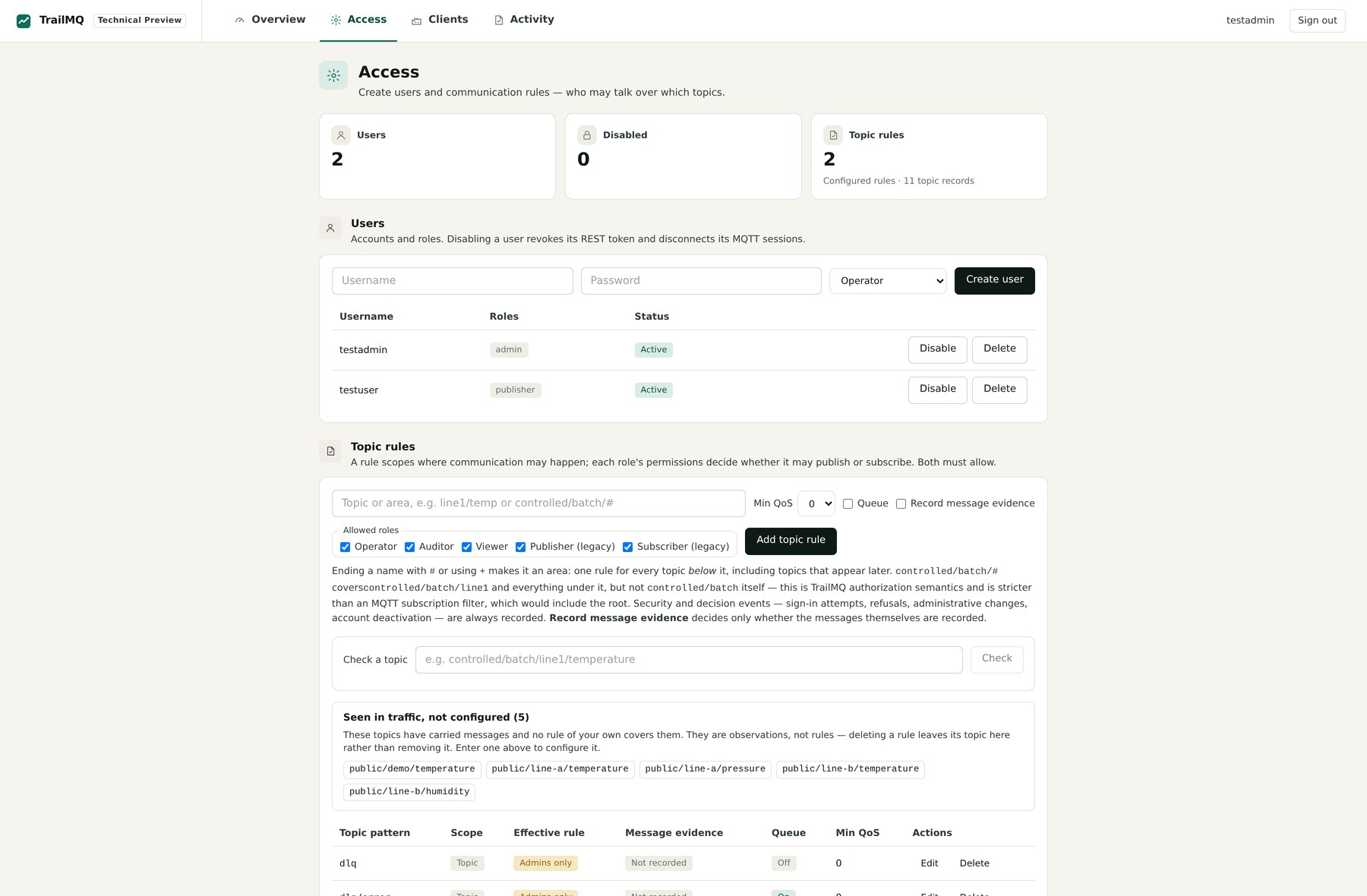
TrailMQ labels this record Outside validated scope rather than quietly implying the chain covers it. Next to this, the Access screen resolves the effective rule for the topic, so the fix is a rule you write deliberately — not a guess.
6 of 6
The refusal you just read sits outside the chain that TrailMQ validates. The chain covers system and action entries — sign-ins, administrative changes, policy and topic-rule changes — and it is neither externally anchored nor digitally signed, so it shows internal consistency, not third-party custody.
Evaluation snapshot · figures from a single local run, not a product property
audit_logsStating the boundary is the point. Extending integrity coverage over MQTT decision records is planned for 3.2 and is not available today.
You now know who was refused, on which topic, and why — from a client error that said none of it. Every line above is reproducible locally. Run it yourself
One command, and the stack runs entirely on your machine. The proof it runs, verify, exercises the product rather than container health: an authorized publish observed arriving at a real subscriber, and a blocked one that does not.
# 1 · get the evaluation stack
git clone https://github.com/RainerGewalt/TrailMQ.git
cd TrailMQ

# 2 · set up, prove and open, in one run
./trailmq try

# or the same run, one step at a time
./trailmq quickstart
./trailmq verify
./trailmq credentials[PASS] Runtime ready
[PASS] MQTT TLS listener accepts authenticated clients
[PASS] Authorized publish reached the subscriber public/demo/temperature
[PASS] Unauthorized publish was blocked restricted/ops/config
[PASS] Denial recorded with user, role, action and topic
[PASS] REST API authentication issues a token
[PASS] System/action audit chain intact
7/7 checks passedOpen http://localhost/trailmq/, sign in as testadmin, and publish to a topic your role does not cover:
mosquitto_pub -h localhost -p 8883 --cafile "$CA" \
  -u testuser -P "$PW" \
  -t 'restricted/ops/config' -q 1 -m '{"setpoint":42}'
Then open Activity and filter Outcome → Denied. Your attempt is the top row, with your client id and the reason attached.
The run takes about 30 seconds once the images are pulled. No local MQTT client is required — verify falls back to a temporary Docker client.
Run TrailMQ without Git, WSL or a shell. Docker Desktop is the only prerequisite.
Download TrailMQ 3.1.1 for WindowsUnsigned evaluation build. Windows will show an unknown publisher, because nothing vouches for who published the file. SHA256SUMS-windows from the same release confirms the file is the artifact this release published — a different claim from who published it.
The public 3.1.1 package is for local, non-production evaluation. Demo certificates and generated users are not deployment-ready. Review the release notes and the license summary; production or commercial use requires a separate agreement.
TrailMQ brings access enforcement and decision review into one workflow. It supports the investigation and the controlled technical correction; the organisational decision — whether this access should exist at all — stays with a person.
The Overview surfaces refused operations from the last 24 hours; Activity filters down to the one you care about.
In 3.1.1One row carries the actor, role, client, topic, event, outcome, whether it was recorded and whether the chain covers it.
In 3.1.1Resolve the effective rule for that topic as it stands today — in the Access screen, or via GET /api/v1/topics/by-name/<path>/effective.
Create or edit the topic rule and the role that needs it, from the UI or the REST API. Both gates still have to allow the action.
In 3.1.1Re-run the publish, or ./trailmq verify, and confirm the new decision was recorded. You drive this step yourself; there is no automated regression of a policy change.
Listed so the direction is visible, not so it can be mistaken for a feature. Nothing in this box ships in 3.1.1, and no organisational approval step is automated in any planned version.
These are the boundaries the product states in its own interface, next to the verdict. They are documentation, not fine print.
A recorded allow means TrailMQ authorized and accepted the operation at the broker. It does not show payloads or name which subscribers received them, and Preview counters are not delivery proof. ./trailmq verify checks delivery with a real subscriber instead.
The hash-linked chain covers system and action entries — sign-ins, administrative changes, identity, role, policy and topic-rule changes. It is not externally anchored, not digitally signed, and does not walk MQTT message evidence, including publish and subscribe refusals. It demonstrates internal consistency, not third-party custody.
TrailMQ is a technical building block. It is not WORM storage, not a notarization service, not a CE declaration, not a GMP/GxP validation or Annex 11 package, and not a 21 CFR Part 11 package. Validation and procedural controls remain yours.
Working under GMP, GAMP 5, Annex 11 or 21 CFR Part 11? How TrailMQ fits a regulated environment — and where it stops
Every MQTT action must pass two independent gates. A role with publish:* can still be refused by the second one.
The identity's role allows the action and the MQTT topic filter.
A rule brings the requested path into scope for a role the identity holds.
http://localhost/trailmq/http://localhost/api/v1mqtts://localhost:8883ws://localhost/mqttStandard MQTT over TLS or WebSocket: mosquitto, Python paho-mqtt, Node.js mqtt.js, or a browser WebSocket client. Point them at the listener with the intended credentials and CA. No TrailMQ SDK, proxy or sidecar.
Four screens: Overview, Access, Clients and Activity, where the integrity verdict also lives. The REST API exposes the same operations for scripts and CI.
Evaluating TrailMQ against a real MQTT use case? Tell me how it went.
Something was allowed or denied.
Know what happened, and why.